XML is rarely intended primarily as a format for humans to look at--at least not directly. Most typically, an XML source is transformed into something else before it becomes ready for human consumption. For prose-oriented documents, the target is usually either an HTML page, or a PDF file (via Formatting Object [FO] tags), or perhaps an actual printed page. XSLT is often used to peform these transformations. For data-oriented XML documents, the target is usually the data format of a DBMS or an in-memory representation by an application that reads XML files.
Readers of developerWorks, however, are generally developers. Our lot is to look at a lot of things that end-users can and should be spared. When something doesn't work in the behind-the-scenes trail of format transformations, it is our job to eyeball the intermediate formats--XML included. During the development process, it is often also our responsibility to develop sample or test XML documents to simulate what might come out of or go into some stage in a distributed application (before the real generator or consumer exists).
Compared to some formats, XML is somewhat manageable in its raw form. Unlike binary formats, it is not out-of-the-question to open an XML document in a text editor or text viewer. But tags can be hard to parse visually, especially if the XML producer does not arrange vertical and horizontal whitespace in ways that aid humans. If a big part of your job is reading raw XML documents, one of the XML editors I reviewed previously (see Resources) is likely to prove useful. But for someone who only occassionally views XML source files--or where these files need to be viewed by a number of people--XML editors are often too expensive; not just in licensing dollars, but in learning curves also.
Almost all developers have a wonderful XML viewer already
installed. Well, at least a pretty good one. Both Internet
Explorer and Mozilla/Netscape make an effort to render XML documents
along with HTML ones, at least in recent versions. Other browsers
like Opera and Konquorer also implement CSS2--Opera 5+ does a
flawless job, Konquorer 2.2 a moderately good one. In general
Mozilla or Netscape 6 do an excellent and accurate job of displaying
an XML document in the styles indicated in a CSS2 stylesheet.
Internet Explorer--at least as of version 6--does a fair job, but
seems to ignore the display:
inline attribute. This makes IE6 less suitable for
displaying prose-oriented XML documents (but it is still good for
data-oriented ones). However, IE6 -does- have the advantage of
displaying XML documents that lack a CSS2 stylesheet in a
hierarchical tree, and allows folding subtrees.
I decided to write this Tip using only a text editor (plus Mozilla
0.9.5) as an exercise. Normally I either use XMetal (with some
XMetal "rules" provided by my dW colleague Benoit Marchal) or write
the source in "smart ASCII" and transform it to XML using the
txt2dw.py tool I wrote about in another
Tip. The exercise helped me understand the ins-and-outs of the
webbrowser+CSS2 approach.
Here is how I approached things. I wrote some words in the
appropriate XML dialect (using an earlier Tip as a template). Then
I created an empty dW.css CSS2 file to
work with, and added the following line to my XML document:
<?xml-stylesheet href="dW.css" type="text/css"?>
So far, Mozilla will not do anything to help see the structure of
the document. What is needed next is to build up a CSS2 stylesheet
for prettifying the XML document. An easy approach is to start
at the top of the XML document, and work our way down. For example,
the first thing in a developerWorks article.dtd document is a <seriestitle>. Let us make that look big
and bold, and center it, for emphasis. Actually, even before that,
there are a few defaults that we know the whole document should have
(we can override them for individual contexts, as needed). This is
the first few lines of my CSS2 file:
$DOCUMENT {
font-family: "Times New Roman";
font-size: 12pt;
margin-top: 5px;
margin-left: 10px;
}
* {
display: block;
background-color: white;
padding: 2px;
}
seriestitle {
font-weight: bold;
font-size: 18pt;
text-align: center;
}
From this point, it is straightforward to move on to the next
elements encountered (<papertitle>
in this case), and so on. After a few additions of block-level
elements, I figured it would be worthwhile to make sure all the
inline elements appear that way. For this, a glance through the DTD
helped remind me of the relevant elements. So I included the
following few lines:
/* Inline Typographic Elements */
a, i, b, sub, sup, p>code {
display: inline;
background-color: inherit;
}
a { color: blue;
text-decoration: underline; }
i { font-style: italic; }
b { font-weight: bold; }
b[class="red"] { color: red; }
b[class="blue"] { color: blue; }
b[class="green"]{ color: green; }
sub { vertical-align: sub }
sup { vertical-align: super }
sub,sup { font-size: small }
Add a few more block-level elements, and one winds up with a very nice presentation of an XML document. Even better, the bit of work I needed to do will be useful every time in the future I need to look at a document in the same XML dialect. And assuming readers use an up-to-date webbrowser, they can view the self-same useful appearance without needing to first transform the XML source to an HTML or PDF format (as developerWorks does as part of its own process).
The procedure for developing a CSS2 stylesheet to match an XML
document dialect is straightforward. You will find different
specific tags to worry about, of course. And for more data-oriented
documents, you will almost surely want to use some display: table attributes
somewhere in the definition. Doing a little work to set up a CSS2
stylesheet makes examining XML documents considerably easier.
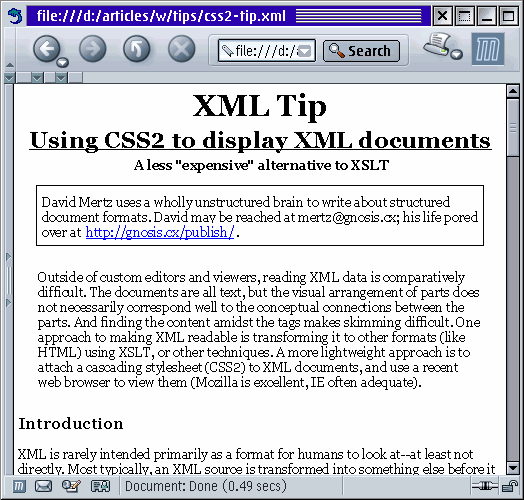
Let me leave the reader with a picture of this document as I have worked with it. The relevant sources can be found in the Resource links, but readers might have different browser versions and platforms which produce somewhat different renderings (or if your browser doesn't do something reasonable, upgrade):