David Mertz, Ph.D.
Writing Template, Gnosis Software
March, 2005
Ruby on Rail is recent entry into the world of web application development that is rapidly gaining mindshare, even while in still in beta versions. Rails succeeds by automating creation of the most common types of web applications, while not straightjacketing if you want to add custom or atypical requirements. Moreover, compared to many Free Software libraries that perform individual aspect of a web application, Rails contains a nicely integrated set of tools for all the aspects of a common web application.
The first thing to understand about Rails is its Model/View/Controller (MVC) architecture. While this approach is not unique to Rails--nor even to web applications as opposed to other programs--Rails provides a very clear and focused MVC way of thinking. If you stray from the MVC approach, Rails becomes far less useful than if you follow its paradigm.
The Model in a rails application is primarily the underlying database
it uses. In fact, in many ways, a Rails application is just a way to
perform manipulations on the data in an RDBMS in a directed way. One
central component of Rails is the class ActiveRecord, which maps
relational tables to Ruby objects--and thereby to the data manipulated
by controllers and shown in views. Rails applications are
particularly likely to use the ubiquitous MySQL database, but bindings
exist for a number of other RDBMS's.
If you like, you can add Ruby code to perform extra validation within
an application model, enforce data relationships, or trigger other
actions. The Ruby files within an application's app/models/ directory
can call a variety validation methods of ActiveRecord. However, you
can also perfectly well leave the Model code as a stub, and rely only
on the constraints of the RDBMS that holds the data. For example, the
application we develop below contains only this skeleton model code
(at least initially):
class Contact < ActiveRecord::Base
end
Controllers carry out your application logic in its abstract form.
That is, the Ruby scripts in an application's app/controllers/
directory will load model data into variables, save it back, massage
and manipulate it. But controllers are not concerned with how the
data is concretely presented and entered by users.
In the general MVC paradigm, this can allow the user multiple styles of interaction with the same Controller--e.g. a native GUI, a web interface, and a blind-friendly speech interface might all interact with the same controller. However, Rails is not quite so general as that, it instead is relatively narrowly focused on providing and collecting data within web pages. Nonetheless, the layout of those web pages--colors, fonts, tables, style sheets, etc.--can be modified independently of controller code.
Rails Views are where we leave Ruby code as such altogether. Rails
contains a very nice template language for .rhtml files, which
combines pure HTML with embedded Ruby code. As well, the very surface
appearance of a Rails application screen is generally controlled by
CSS stylesheets. The .rhtml format is an enhancement of HTML.
Actually, a simple HTML file by itself is also a valid RHTML template,
but there is not much point in omitting the scripting control that
RTHML gives you.
RHTML is a true template format, not simply a way of embedding code in
HTML, which is a much more powerful approach. For those readers
familiar with PHP, think of the contrast between PHP itself and Smarty
templates. That is, embedded scripting just intermixes code with
uninterpreted HTML: the code portion is still responsible for issuing
print statements when it wants to say something to the client. In
contrast, a template engine adds a custom set of tags to HTML that
allow you to express conditions, loops, and other logic as part of the
enhanced HTML markup.
The tools Rails gives you are basically a set of code generators. I like this approach much better than a development environment that forces me to use a rigid workspace and IDE. Rails does not get in your way, but nonetheless saves most of the work of manual programming--or at least eases you into the parts that require manual coding by providing first-pass scaffolding "for free."
The notion of scaffolding, in fact, is a central notion in Rails. Very simple applications can almost entirely avoid custom coding by letting rails dynamically generate client HTML pages as it runs. A first pass at code generation creates just the raw scaffoling; you can subsequently generate more specific controllers, views, and models that you wish to customoize. But you need not generate much to get started.
Rails relies on a fixed, and fairly commonsensical, organization of its files. But this organization is relatively rigid; you will just fight with the Rails environment if you try to force other file and code organizations. Then again, I cannot really see any reason not to go along with the organization Rails gives you; for the most part it "fits your brain" (as Ruby fans like to say).
Several tutorials are available on the Ruby on Rails website that walk you through creating a simple Rails application (see Resources). I will not do much differently from any of them; there is a certain right way to get started on a Rails application. Given the relatively short length of this introduction, I will simply recommend one of those longer tutorials for more thorough examples.
The application I will create is a basic address book. My goals for the application are low, I just want to show readers the general steps involved in creating an application.
The first thing we need to do for any application is create a database for its data to live in. Technically, this step need not occur absolutely first; but it needs to occur early, and it feels conceptually clear to me to create the database before any application code (even automatically generated code). So let us create a database in MySQL, and a first table within this database. Consult other documentation for how to get MySQL--or another RDBMS--up and running. Here we just assume MySQL is installed and available.
[~/Sites]$ cat AddressBook.sql
CREATE DATABASE IF NOT EXISTS AddressBook;
USE AddressBook;
CREATE TABLE IF NOT EXISTS contacts (
  id smallint(5) unsigned NOT NULL auto_increment,
  name varchar(30) NOT NULL default '',
  created_on timestamp(14) NOT NULL,
  updated_on timestamp(14) NOT NULL,
  PRIMARY KEY (id),
  UNIQUE KEY name_key (name)
) TYPE=MyISAM COMMENT='List of Contacts';
[~/Sites]$ cat AddressBook.sql | mysql
There are a couple things to notice in this first table. Of central
importance is that every table must have an id column, with
exactly that name. Rails uses the primary key column id for various
record keeping and referencing. The fields created_on and
updated_on are not required, but if you do include them, Rails
maintains them automatically "behind the scenes"; in most cases there
is no harm in using these timestamps. So the only "real" data we have
yet added is a name for our address book contacts.
Another little oddity exists with Rails use of singular and plural
names for various things. Various items are renamed between singular
and plural versions, depending on their usage and context. Table
names should use the plural form. I have not experimented with words
having irregular plurals; e.g. datum and data might trip up Rails.
Now that we have a database to interact with, let us create the
AddressBook application. The first step is simply running rails
to generate the basic directories and scaffold code:
[~/Sites]$ rails AddressBook
create
create  app/apis
create  app/controllers
create  app/helpers
create  app/models
create  app/views/layouts
create  config/environments
create  components
[...]
create  public/images
create  public/javascripts
create  public/stylesheets
create  script
[...]
create  README
create  script/generate
create  script/server
[...]
I have abridged the output of running rails. All the omitted lines
remind you of various files and directories that were created. Try it
on your system and browse through all the created files. I display a
few of the most important files and directories above.
Having created the AddressBook/ directory and needed children, we
need to perform just some barest initial configuration. First let us
set the database by modifying a YAML configuration file:
[~/Sites]$ cd AddressBook
[~/Sites/AddressBook]$ head -6 config/database.yml # after editing
development:
  adapter: mysql
  database: AddressBook
  host: localhost
  username: some_user
  password: password_if_needed
And finally, we need to serve the data. Rails comes with its own
single-function webserver WEBrick, which is perfectly good. You may
also follow instructions at the Ruby on Rails website to configure
Apache or other servers to serve Rails applications via FCGI (or plain
CGI, but plain CGI will be slow).
[~/Sites/AddressBook]$ ruby script/server -d
=> Rails application started on http://0.0.0.0:3000
[2005-03-21 17:57:38] INFO  WEBrick 1.3.1
[2005-03-21 17:57:38] INFO  ruby 1.8.2 (2004-12-25) [powerpc-darwin7.8.0]
The prior steps are enough to let you view a welcome splash page on
the WEBrick port. For example, on my local system, I can now view
http://gnosis-powerbook.local:3000/. But we need to generate just a
bit more code to manipulate our custom database. We do this with the
script generate that was created within our AddressBook/
application directory:
[~/Sites/AddressBook]$ ruby script/generate model contact
      exists  app/models/
      exists  test/unit/
      exists  test/fixtures/
      create  app/models/contact.rb
      create  test/unit/contact_test.rb
      create  test/fixtures/contacts.yml
[~/Sites/AddressBook]$ ruby script/generate controller contact
      exists  app/controllers/
      exists  app/helpers/
      create  app/views/contact
      exists  test/functional/
      create  app/controllers/contact_controller.rb
      create  test/functional/contact_controller_test.rb
      create  app/helpers/contact_helper.rb
Notice here that we have gone back to the signular contact rather
than the plural contacts in the corresponding table name. Now we
need to edit just one more generated file, just a bit:
[~/Sites/AddressBook]$ cat app/controllers/contact_controller.rb
class ContactController < ApplicationController
  model :contact
  scaffold :contact
end
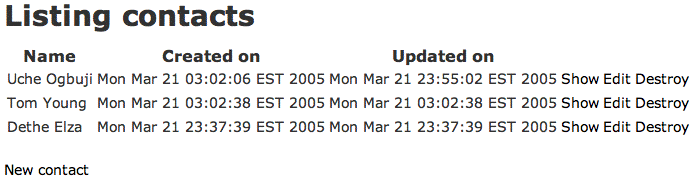
Now we can view and modify the content of our database at a URL like
http://rails.server/contact/ (e.g. in my test case
http://gnosis-powerbook.local:3000/contact/). After entering a
little data, it looks something like:
The prior generated code creates a fully working interface to view and modify our database. But all the formatting, presentation, and business logic (such as there is) is done dynamically by Rails, and without any great sophistication. In order to get something a bit more custom, we need to generate just a bit more code. What we need now is for Rails to explicitly write out all the scaffolding it is implicitly generating on-the-fly, so that we can tinker with it.
[~/Sites/AddressBook]$ ruby script/generate scaffold Contact
  dependency  model
      [...]
      create  app/views/contacts
      exists  test/functional/
      create  app/controllers/contacts_controller.rb
      create  test/functional/contacts_controller_test.rb
      create  app/helpers/contacts_helper.rb
      create  app/views/layouts/contacts.rhtml
      create  public/stylesheets/scaffold.css
      create  app/views/contacts/list.rhtml
      create  app/views/contacts/show.rhtml
      create  app/views/contacts/new.rhtml
      create  app/views/contacts/edit.rhtml
We have a bit more to work with. Notice that this code has gone back
to the plural form contacts (for reasons not clear to me, but we
need to accept it). Let us modify a few things. Maybe we can change a
few colors and fonts in the CSS:
[~/Sites/AddressBook]$ head -8 public/stylesheets/scaffold.css
body { background-color: #ffe; color: #338; }
body, p, ol, ul, td {
  font-family: verdana, arial, helvetica, sans-serif;
  font-size:   13px;
}
td { border: 1px solid; }
a { color: #eef; background-color: #446; }
a:hover { color: #fff; background-color:#000; }
Now that we have the code, what does contacts_controller.rb do? It
is more explicit and configurable in its action that the
contact_controller.rb we saw above. In part, the controller looks
like:
class ContactsController < ApplicationController
  def list
    @contacts = Contact.find_all
  end
  def show
    @contact = Contact.find(@params['id'])
  end
  def create
    @contact = Contact.new(@params['contact'])
    if @contact.save
      flash['notice'] = 'Contact was successfully created.'
      redirect_to :action => 'list'
    else
      render_action 'new'
    end
  end
As promised, a Controller's main job is to load data into variables.
The object Contact is the ActiveRecord object-relational mapping
the Model provides. The variables @contacts or @contact are given
data in their appropriate methods. The methods are themselves
referred to by URL's such as http://rails.server/contacts/show/2
(this one to show the contact with id of 2).
The controller above ultimately connects to views, RHTML files that
make use of the data values loaded into variables by the controller.
For example, here is part of the list view:
[...]
<% for contact in @contacts %>
  <tr>
  <% for column in Contact.content_columns %>
    <td><%=h contact.send(column.name) %></td>
  <% end %>
    <td><%= link_to 'Show', :action => 'show', :id => contact.id %></td>
    <td><%= link_to 'Edit', :action => 'edit', :id => contact.id %></td>
    <td><%= link_to 'Destroy', :action => 'destroy', :id => contact.id %></td>
  </tr>
<% end %>
[...]
The method ContactsController.list loads the variable @contacts,
and the flow control tags in RHTML pull out the individual records
from the array.
Our initial model contained only a name for a contact. Unfortunately,
given the length constraint of this article do not have room to expand
the model to include actual contact data--phone numbers, addresses,
emails, etc. In general, that data would live in a child table, with
a foreign key relation to the table contacts. The Rails model would
indicate the relation with custom code something like:
class Phone < ActiveRecord::Base
  belongs_to :contact
end
But to wrap up this article, let us change our data model just slightly, and see how that affects our application. First let's add a column:
$ cat add-contact-date.sql
USE AddressBook;
ALTER TABLE contacts ADD first_met date;
$ cat add-contact-date.sql | mysql
Now that we have changed the underlying model
http://rails.server/contact/ (the behind-the-scenes version of the
scaffolding) simply adjusts with no effort on our part. The
controller and view are fully automated based on the model. But the
application version at http://rails.server/contacts/, with our hand
tweaked files is not quite as automatic.
The list view automatically looks for all the columns, whatever
they may be, by including Contact.content_columns as part of the
template loop. But other views like edit have already been
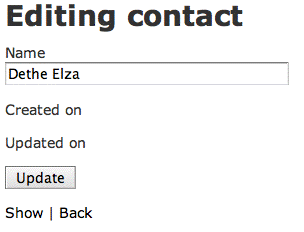
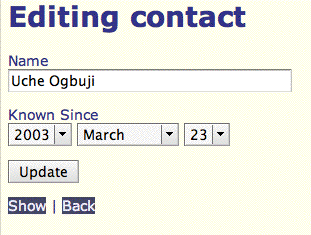
generated, and we need to add our new data fields. For example:
<h1>Editing contact</h1>
<%= error_messages_for 'contact' %>
<%= start_form_tag :action => 'update' %>
<%= hidden_field 'contact', 'id' %>
<p><label for="contact_name">Name</label><br/>
  <%= text_field 'contact', 'name'  %></p>
<p><label for="first_met">Known Since</label><br/>
  <%= date_select "contact", "first_met", :use_month_numbers => false %></p>
<input type="submit" value="Update" />
<%= end_form_tag %>
<%= link_to 'Show', :action => 'show', :id => @contact.id %> |
<%= link_to 'Back', :action => 'list' %>
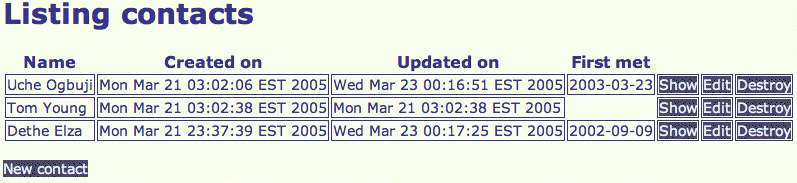
So what does our hand tweaked application look like. Not a lot different from the default, but you can see our modifications in action:
Rails is an extremely quick way to develop quite flexible web applications. This introduction just barely touched on the style of working with Rails; but the full framework contains a considerable collection of useful classes and methods for carrying out the actions most used in web-based applications.
Moreover, the best thing about Rails is perhaps the fact it gives you a whole "Rails way of thinking" with all the supporting code you need to use it. This is a big plus over other toolkits and frameworks that give you only much more raw materials to work with (perhaps adequate, but not well focused). Rails development gives you a clear path from a half-formed idea to a fully function web application.
The home page for Ruby on Rails is the place to get started:
http://www.rubyonrails.com/
On that site are a number of introductory tutorials and guides, along with downloadable source and documentation. Unfortunately, while the guides are useful, the raw API and usage documentation is still less polished. The documentation seems correct, it just does not feel very inviting. I expect that will improve with time.
One nice resource linked to on the Rails website is a ten minute video that shows real-time development of a working web application. While I am sure the video required quite careful scripting and practice to create, the fact it is possible to go from nothing to a working application in ten minutes is pretty impressive (the screen capture video shows the various code generation and editing in live action):
http://media.nextangle.com/rails/rails_setup.mov
Wikipedia contains an excellent entry on the Model/View/Controller architectural paradigm.
http://en.wikipedia.org/wiki/Model_view_controller
To David Mertz, all the world is a stage; and his career is devoted to
providing marginal staging instructions. David may be reached at
[email protected]; his life pored over athttp://gnosis.cx/publish/.
Suggestions and recommendations on this, past, or future, columns are
welcomed. Check out David's book Text Processing in Python at
http//gnosis.cx/TPiP/.